FAQ: Frequently Asked Questions about Aelo
Frequently asked questions about Aelo: how much does it cost, what are AeloCoins, which AI models do we measure, do we publish content, and what…
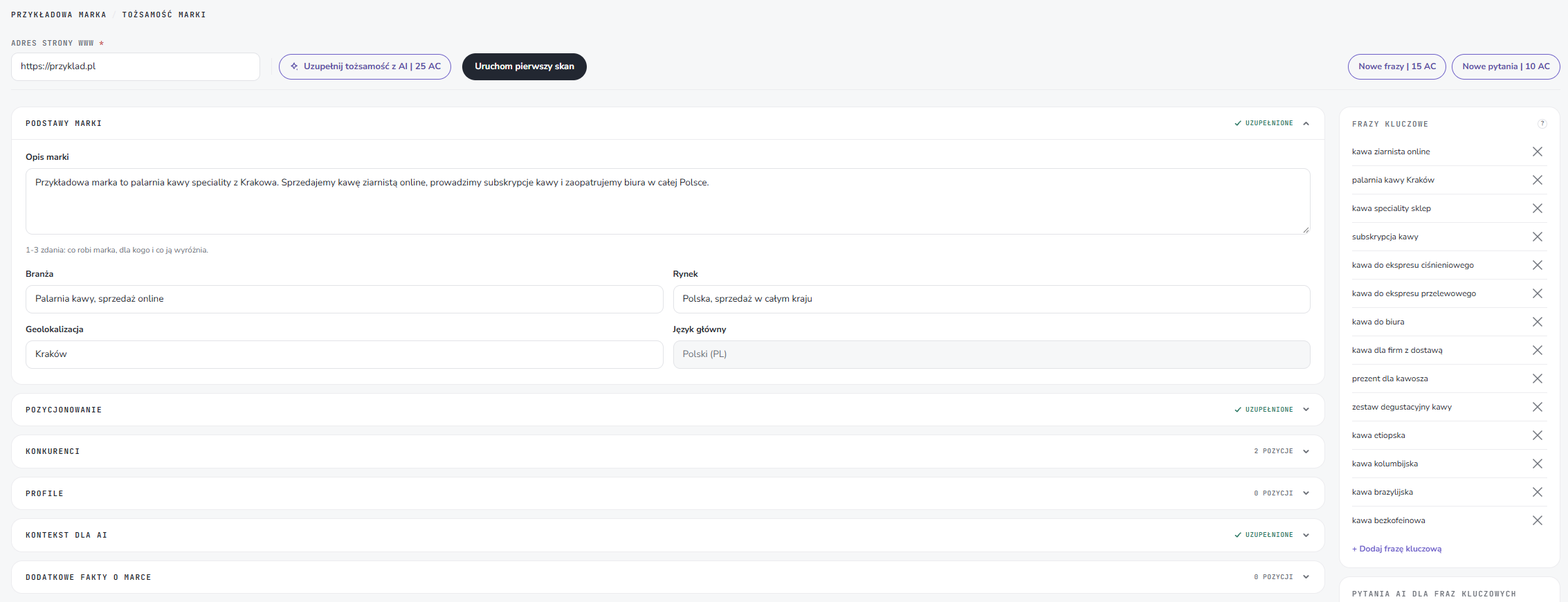
Brand identity is a description of your business on Aelo: what you do, who your customers are, what sets you apart and who your competitors are. This information forms the basis for scans, tasks in Tickets, the advisers’ replies in Advisors and content in Studio. The more accurately you complete it, the more accurate the results will be in AI Visibility.
Below, we describe each section of the identity form: what to enter in each section and how Aelo uses that information.
Click on the brand name in the top left-hand corner of the panel. In the brands menu, there is a cog icon next to each brand: this takes you to its profile. For a new brand, the profile opens automatically as soon as you click on it Save in the form adding a brand.
You have two options:
Even if you’re using AI, go through all the fields and correct anything the system has interpreted differently from what you intended. Nobody knows your brand better than you do.
Enter a description of the brand in 1–3 sentences: what it does, who it is for, and what sets it apart. Add the sector, market, location and main language.
What is it for: On this basis, Aelo formulates questions for AI models and checks whether the models describe your brand accurately. When they do not, the text will help AI is providing false information about the company.
Complete the target group, tone of voice, USP, i.e. what makes your offer stand out, and prohibited words. Here you can also enable emojis in the adviser’s replies (they are disabled by default).
What is it for: Our consultants and Studio write in your language, for your clients, and avoid words you don’t use.
Add the companies you’re competing with for customers: their name, domain and name variations. We explain how many to enter and how to do it in the article on competition.
What is it for: Aelo checks whether the models they recommend your competitors instead of you, and compares you in the scan results.
Add links to the brand’s profiles, for example on social media, in business directories or on review sites. This section is optional, but it’s worth filling it in.
What is it for: Profiles help Aelo link mentions to your brand and find out where influencers get their information about it.
Enter topics, content pillars, brand aliases, customer issues (pain points) and search intents. In the field Client agreements Make a note of what must not be proposed: the dossier and action plan will not propose this. This field is particularly useful agencies, which are run by clients’ brands.
What is it for: Aliases make it possible to recognise a brand spelled differently, whilst customer topics and issues direct tasks and content to where they are most relevant.
Add any details that the scan doesn’t capture automatically but which the AI should know about, such as a certificate, an award or the year the company was founded. Each fact has a category and a description.
What is it for: facts contribute to brand awareness in Synapsis and help you check whether the models are telling the truth about you.
The column on the right contains key phrases – that is, the topics against which we measure brand visibility. We explain how to select them in a separate article on selection of keywords.
There is no save button in the profile. Changes are saved automatically and take effect the next time you full scan. Next to each section, you’ll see either a tick or the number of items, so you can tell straight away what’s already been filled in.
Not all of them are compulsory, but the more information you provide, the more accurate the scans, tasks and content will be. You won’t be able to run a scan without a website address and basic details.
25 AeloCoins. Manual top-ups are free of charge.
Yes. Changes are saved automatically and are included in the next full scan.
You use it to list what must not be proposed. The dossier and action plan will not propose anything that you include in it.
You can read more about why a good brand description matters for AI chatbots in the article on brand visibility in AI.