FAQ: Frequently Asked Questions about Aelo
Frequently asked questions about Aelo: how much does it cost, what are AeloCoins, which AI models do we measure, do we publish content, and what…
AI Visibility is the first screen you see when you open a brand. It brings together the results of the latest full scan: whether AI chats mention your brand, which models do it most often, how you compare with competitors and what blocks recommendations.
Below we describe each tile in turn. If your brand is not in the panel yet, start with the guide how to add a brand in Aelo.
The screen has eight tiles. In the top right corner you choose the Range: 7, 30 or 90 days. Each tile has a See detailsbutton that opens the full view of that module.
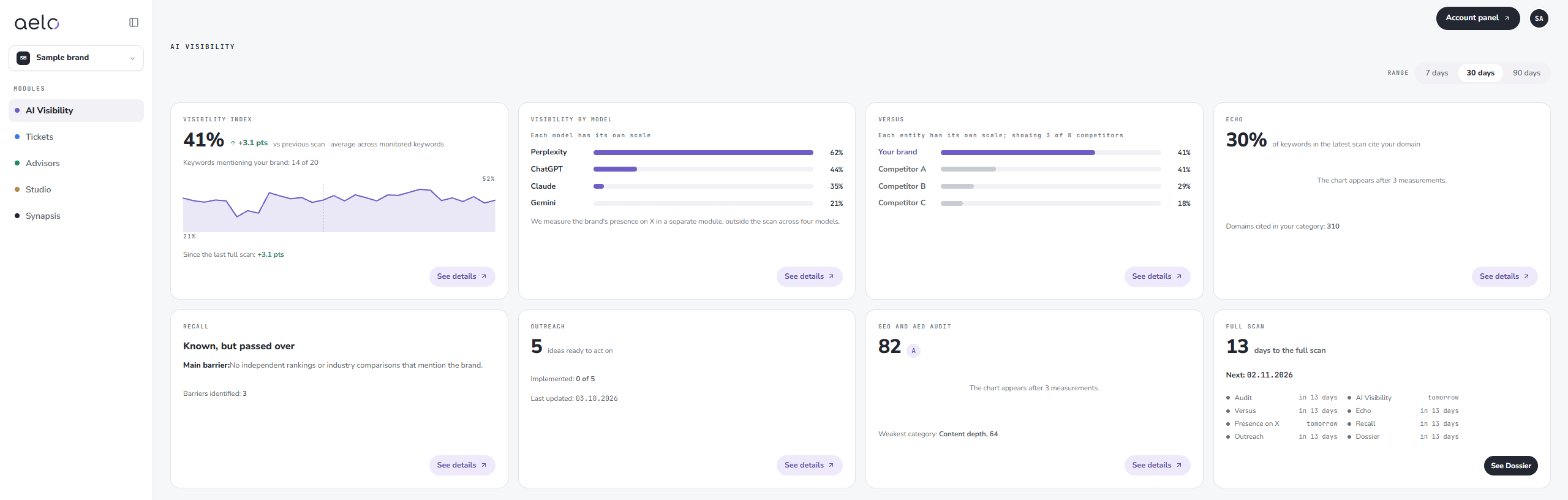
This is the main number on the screen: the brand's average visibility across all monitored keywords. Next to it you see the change since the previous scan in percentage points, and below it how many keywords included a mention of the brand.
The chart shows how the index changed in the selected range. It appears after three measurements, so after the first scan you will only see the number.
This tile breaks the result down into four AI models: Perplexity, ChatGPT, Claude and Gemini. Each model has its own scale, so compare a model with itself over time rather than models with each other. We measure the brand's presence on X in a separate module, outside the scan across the four models.
Versus shows how often AI chats mention your brand compared to your competitors. You can see three competitors on the tile, with the full list available in the details. You can add competitors in Brand Identity, under the Competitors section. We explain how to select them in the article how to add competitors.
Echo tells you in what share of keywords from the latest scan AI chats cited your domain as a source. Below it is the number of domains cited in your category, that is, the sites the models take their answers from. Read more about what a citation in AI answers is in our glossary.
Recall describes how the models know your brand, for example “Known, but passed over”. Below the label is the main barrier, the reason why AI does not recommend the brand, and the number of all barriers identified. We explain why a brand can be known and still not recommended in the article known, but not recommended.
The last tile is the schedule. You see how many days are left until the next full scan and its date. Below is a list of modules with their dates: Audit, AI Visibility, Versus, Echo, Presence on X, Recall, Outreach and Dossier. Some modules refresh more often than the full scan.
The See Dossier button opens the report with results and an action plan. The Dossier also shows a table of results from the brand's latest measurements, up to six scans back.
The first full scan is one you run yourself, from the list Start with these steps. The step “Run the first full scan” has a button: when the brand identity is not ready, it takes you to complete it, and when it is ready, it starts the scan right away. No need to wait by the screen. Further full scans run on schedule.
Changes in Brand identity save automatically and apply at the next full scan. How often it is worth measuring visibility is covered in the article how often to measure visibility, and the whole measurement method in our methodology.
AI chats do not answer the same way every time. The same question asked twice can return a different list of brands. That is why a single drop or rise of a few points does not have to mean anything. Look at the trend across several measurements and at whether the change repeats in later scans.
The range switch helps too. The 7-day view shows recent fluctuations, while 30 and 90 days show the direction better. If the result falls for several scans in a row, check Recall and Versus: they usually show whether the problem is a lack of signals about the brand or stronger competition.
Each tile points to a different course of action:
A mention and a citation are two different things. A mention is naming the brand in an answer, while a citation is referring to your website as a source. The difference between a model knowing a brand and recommending it is described in the glossary entry recognition and recommendation.
The chart appears after three measurements. After the first scan you only see the value.
Better not. Each model has its own scale, so compare a model with itself across scans.
In Brand identity, in the Competitors section, with the Add competitor button. The change applies at the next full scan.
You see the date and the number of days left on the Full scan tile, in the bottom right corner of the AI Visibility screen.
The time range used for charts and comparisons. A shorter range shows recent fluctuations, a longer one shows the trend better.
A mention is naming the brand in an AI answer. A citation is referring to your website as a source. Citations are shown on the Echo tile.
Didn't find the answer to your question? Visit Aelo Help or write to kontakt@aeloapp.io.