FAQ: Frequently Asked Questions about Aelo
Frequently asked questions about Aelo: how much does it cost, what are AeloCoins, which AI models do we measure, do we publish content, and what…
The first measurement is the moment when Aelo checks, for the first time, whether AI chats mention your brand – in other words, what its visibility in AI. This forms the basis for the results in AI Visibility, full report and the first tasks in Tickets. You can discuss the results straight away with advisers at Advisors.
In this article, we explain how to get it up and running, what happens within it, and how it differs between the Free plan and the paid plans. In the video below, we show the entire measurement process: from the moment you click to the first results.
You start the first measurement yourself once the brand is ready:

You don’t have to wait in front of the screen. Once you’ve clicked on the step Run the first full scan a bar appears with the text In progress, and the card Full scan shows which stages are already complete:
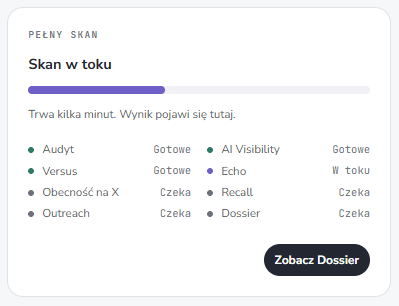
The duration depends on how extensive the brand is: the more phrases, competitors and identity data there are, the longer it takes. For a brand with 6 phrases and 2 competitors, the first measurement took around 9 minutes in our test. We demonstrate the entire process from adding a brand in the video in the article How to add a brand in Aelo.
Aelo asks questions based on your keywords to four AI models: ChatGPT, Claude, Gemini and Perplexity. The questions are neutral, meaning they do not contain your brand name. This allows the scan to show whether the model mentions you of its own accord when a customer asks about a category.
The set of questions is locked after the first scan. Subsequent measurements use the same questions, so results from different days and months can be compared. We describe the details in methodology.
The first measurement is the same in every scenario. The difference lies in what happens next:
The measurement and full report are included in the subscription. You don’t pay for them AeloCoins. We explain in the article why daily measurements and a monthly report are a good rhythm how often to measure visibility. You can find a comparison of the plans in pricing.
AI chatbots respond slightly differently each time, even to the same question. A single decline or an increase does not necessarily mean a change in visibility. Look at the trend based on several measurements. We explain this in the text Why does AI give a different answer every time?.
You’ll also have to wait to see the effects of the changes on the website and elsewhere. We explain how long this takes in the article why changes take time.
No. You start it by clicking the ‘Start first scan’ button once you have completed the brand identity details and selected your keywords.
It depends on how extensive the brand is: the more phrases, competitors and identity data there are, the longer it takes. For a brand with 6 phrases, it took around 9 minutes. You don’t need to wait in front of the screen; the results will appear in AI Visibility.
The graph appears after three measurements. After the first scan, you can see the result itself.
No. On the Free plan, the measurement and full report are one-off. Daily measurements and monthly reports are included in the paid plans.
No. The measurement and the full report are included in the subscription.
AI chatbots respond slightly differently each time. Assess the trend based on several measurements, rather than a single result.
Is the measurement not starting, or do the results look unusual? Please email kontakt@aeloapp.io.